
How to Create a Workflow Online From Scratch
Creating workflows has become essential for businesses looking to eliminate manual bottlenecks and scale operations efficiently. Whether you're building workflows from scratch or looking to create custom workflow solutions for specific applications, understanding the fundamentals of workflow design can transform how your team operates.
This guide walks you through everything you need to know about creating workflows that drive real results, from initial planning to implementation and optimization.
What is a workflow and why does it matter?
A workflow is a structured sequence of tasks that moves work from start to completion, with clear ownership, decision points, and outcomes at each stage. Think of it as a roadmap that guides information, documents, or tasks through predefined steps to achieve a specific business goal.
Modern workflows combine:
- Process mapping that visualizes each step and decision point
- Task automation that eliminates repetitive manual work
- Role assignment that establishes clear accountability
- Real-time tracking that provides visibility into progress
- Integration capabilities that connect existing business systems
Businesses using automation to create workflow for application reports an average saving of $46,000 annually while reducing time spent on collaborative activities by 30%. With 80% of organizations planning to adopt intelligent automation in 2025, the gap between automated and manual processes continues to widen.
Why creating a workflow is important for your business?
Workflows streamline tangled up business processes, minimize the complexities in repetitive tasks, and improve the overall efficiency of a process. 30%[1] reduction in time Spent on Workflows: Implementing workflow automation can lead to a typical time savings of 30% during collaborative activities, according to interviews conducted by Forrester.
In addition to the structure and simplicity, workflows offer numerous other advantages, such as linking data fields to a master dataset.
Creating workflows are important because they:
- Streamline processes
- Eliminate redundant tasks
- Spot bottlenecks and process gaps
- Enhance accountability
- Reduce micromanagement
- Keep the process transparent
- Improve collaboration
- Offer more actionable business insights
However, creating a custom workflow from the ground up is no small feat. One challenge for the workflow creator is keeping the big picture in mind as they fiddle with forms and conditions.
This is why it is essential to get a better understanding of the whole process before you start looking for a tool to build a workflow.
How to create a workflow online in 7 simple steps?
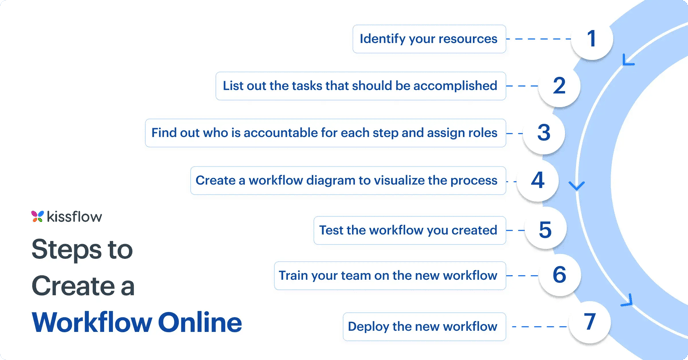
- Identify your resources
- List out the tasks that should be accomplished
- Find out who is accountable for each step and assign roles
- Create a workflow diagram to visualize the process
- Test the workflow you created
- Train your team on the new workflow
- Deploy the new workflow
1. Identify your resources
To replicate and improve existing workflows, you need to understand how they are actually handled now. Are workflows managed completely using paper forms? Are there digital forms and email threads? Where or whom do people send the completed or approved forms to?
The resources that make up a workflow are not just restricted to forms and operating procedures; they also include the people involved in the current process. Before creating a workflow management system for a specific process, talk to process owners and learn about the problems they face in the current method.
For instance, if you’re creating a budget approval app, reach out to your finance team and learn how they handle the process manually. Find out what they would expect from an online workflow, and try to replicate it.
2. List out the tasks that should be accomplished
Workflows with little to no structure have a linear path of tasks to perform, whereas highly structured workflows have a graph-like sequence of tasks to be completed in parallel, or conditional tasks before moving on to the next step. It is essential to get a thorough understanding of the task structure and the data exchanged in tasks before you design your online workflow management strategy.
For example, a travel reimbursement approval workflow needs to fetch the expense data from the initiator and pass it on to the manager. The manager just needs to view the data, not edit it. While approved claims can be forwarded to the finance team for processing with a note of approval, rejected claims have to sent back to the requestor with specific reasoning.
3. Find out who is accountable for each step and assign roles
Once you find out the task’s structure and nature, look at the people who will be a part of the workflow orchestration. Some tasks could move on to the next step automatically, while others may have to be approved or reviewed by someone before it progresses to the next step.
Make note of all stakeholders, their specific responsibilities in the process, and the information they require to perform the task swiftly. Based on that, create specific roles and establish accountability for each task.
In a leave management workflow, an employee might need permission to initiate a leave request (input task), while the manager just needs to approve or reject it based on specific criteria (approval task). Other stakeholders like HR and finance staff might just need to view the approval status.
4. Create workflow diagrams to visualize the process
Now that you’re done with the initial groundwork, you can start sketching out your workflow diagrams. By creating a workflow diagram, you can obtain the visual representation of the complete workflow.
Unless you’re very proficient with business process modeling, opt for a simple workflow management software that lets you create workflows using drag and drop visual tools. Choose a user-friendly tool that is flexible enough to draw a workflow that is a digital version of the paper-based workflow regardless of process complexities.
5. Test the workflow you created
If you have created the workflow, this should be the last step, right? Not really. You can not move your processes to an online workflow without testing it.
On the outside, every workflow application might look perfect. You will never really know its flaws unless you test it rigorously. Rather than doing this step on your own, involve the people who are part of the workflow. They will help you pinpoint problems faster and figure out what works and what doesn’t.
Collect their feedback and use the data to modify and improve your online workflow management and automated workflow.
6. Train your team on the new workflow
Your workflow may work like a charm, but that doesn’t seal the deal. People do. Even though people have been helpful in giving you input, helping you design, and testing out the workflow, they might be hesitant to let go of their current practice. And most of it is the fear of unknown.
A good training program will eliminate their hesitation and give them the confidence to use the new workflow. Sharing the “create workflow” process and your workflow examples will help trainees obtain a better visual picture of what the workflow does, where each task is situated, and their specific role in the workflow.
7. Deploy the new workflow
Once you’re done with the testing and training phase, your workflow is ready to be deployed. As a note of caution, it is better to release the workflow to a small team and check how it works in real-time. Depending on the results, you can either move on and share it with your whole organization or withdraw the application for modification.
You can always go back and create a brand-new workflow when you have a new requirement. In case of policy changes or additional requirements, you can always opt to roll out a new version or update the existing one regularly.
If you're building workflows from scratch, this Power Automate overview can help you understand how automation tools support the creation process.
Building workflows for specific applications
Creating interactive workflows
Interactive workflows engage users through dynamic forms, conditional logic, and real-time feedback. Key elements include:
- Conditional fields that appear based on previous answers
- Inline validation that catches errors immediately
- Progress indicators showing completion status
- Context-sensitive help and guidance
- Mobile-responsive interfaces for on-the-go access
Interactive workflows improve completion rates and data quality by guiding users through complex processes step by step.
Streamlining workflows in the messy middle
The "messy middle" refers to the complex, unpredictable stages where work often stalls. Strategies for managing this include:
- Building flexible approval chains that adapt to different scenarios
- Creating exception handling rules for edge cases
- Implementing status dashboards for visibility
- Setting automatic escalations for overdue tasks
- Allowing ad-hoc routing when needed
Successful workflows balance structure with the flexibility to handle real-world complexity.
Creating custom workflows from scratch
When building custom workflows without templates, follow these principles:
- Start simple and add complexity gradually
- Focus on the happy path first, then handle exceptions
- Use clear naming for stages and actions
- Document decision logic and business rules
- Plan for future modifications
No-code workflow platforms make it easy to create custom solutions tailored to unique business requirements without technical expertise.
How Kissflow's no-code platform simplify workflow creation
Traditional workflow development required extensive coding knowledge and IT involvement. Modern no-code workflow platform like Kissflow have democratized workflow creation through:
Visual Drag-and-Drop Builders Design complex workflows by dragging elements onto a canvas. No programming required to create forms, set rules, or configure automation.
Pre-Built Templates Start with proven workflow templates for common processes like approvals, requests, and onboarding. Customize as needed for your specific requirements.
Easy Integration Connect workflows to existing tools through native integrations or APIs. Data flows automatically between systems without custom code.
Rapid Iteration Make changes quickly without developer support. Test different approaches and optimize based on real-world performance.
Governance and Control While business users can create workflows, IT maintains oversight through permissions, security controls, and compliance frameworks.
FAQs on workflow creation:
1. What is the best way to create workflows?
Start by mapping your current process, identify inefficiencies, then use no-code workflow software to build, test, and optimize your solution iteratively.
2. How long does it take to build a workflow?
Simple workflows can be built in hours, while complex enterprise workflows may take weeks. No-code platforms significantly reduce development time.
3. What tools can I use to create a workflow?
Popular tools for creating workflows include Kissflow for custom workflow creation, Lucidchart for visual diagrams, Zapier for automation, and Microsoft Power Automate for complex integrations. Choose a tool based on your needs and technical expertise.
4. Do I need coding skills to create workflows?
No. Modern no-code workflow platforms use visual builders that let business users create sophisticated workflows without programming knowledge.
5. What are the best practices for creating an effective workflow?
Best practices for creating a workflow include: keeping it simple and intuitive, involving stakeholders in the planning phase, using visual diagrams, leveraging automation for repetitive tasks, and continuously reviewing and improving the workflow.
Related Articles

6 MINUTES READ
What Is an Agile Workflow? Steps to Build One
6 MINUTES READ
Approval Workflows Explained: Process, Steps & Benefits
6 MINUTES READ
What Is an Internal Process? Steps to Improve It










